Choosing the right 110-volt surge protector for your TV and computer is one of the most practical decisions you can make to protect valuable electronics in your home or office. Voltage fluctuations, sudden power surges, and unexpected spikes are daily realities in many electrical grids, and without adequate protection, these events can silently degrade or instantly destroy your devices. A quality 110-volt surge protector stands between your equipment and unpredictable electrical events, giving you peace of mind and extending the lifespan of your electronics.
The market offers a wide variety of surge protection devices, but not all of them are equally suited for sensitive electronics like flat-screen televisions and desktop or laptop computers. Understanding the specific criteria that distinguish an effective 110-volt surge protector from a basic power strip will help you make an informed purchase. This guide walks you through the key factors, technical specifications, and practical considerations you need to evaluate before selecting the best option for your setup.
Many consumers mistakenly treat surge protectors and power strips as interchangeable products, but they serve fundamentally different purposes. A basic power strip simply extends the number of outlets available from a single wall socket, offering no protection against voltage irregularities. A 110-volt surge protector, on the other hand, contains internal components specifically designed to absorb or divert excess electrical energy before it reaches your connected devices.
The core protective component in most surge protectors is a metal oxide varistor, commonly known as a MOV. When voltage rises above a safe threshold, the MOV absorbs the excess energy and converts it to heat, preventing the spike from damaging your TV or computer. Understanding this mechanism helps you appreciate why the quality and capacity of these internal components matter so much when choosing a 110-volt surge protector.
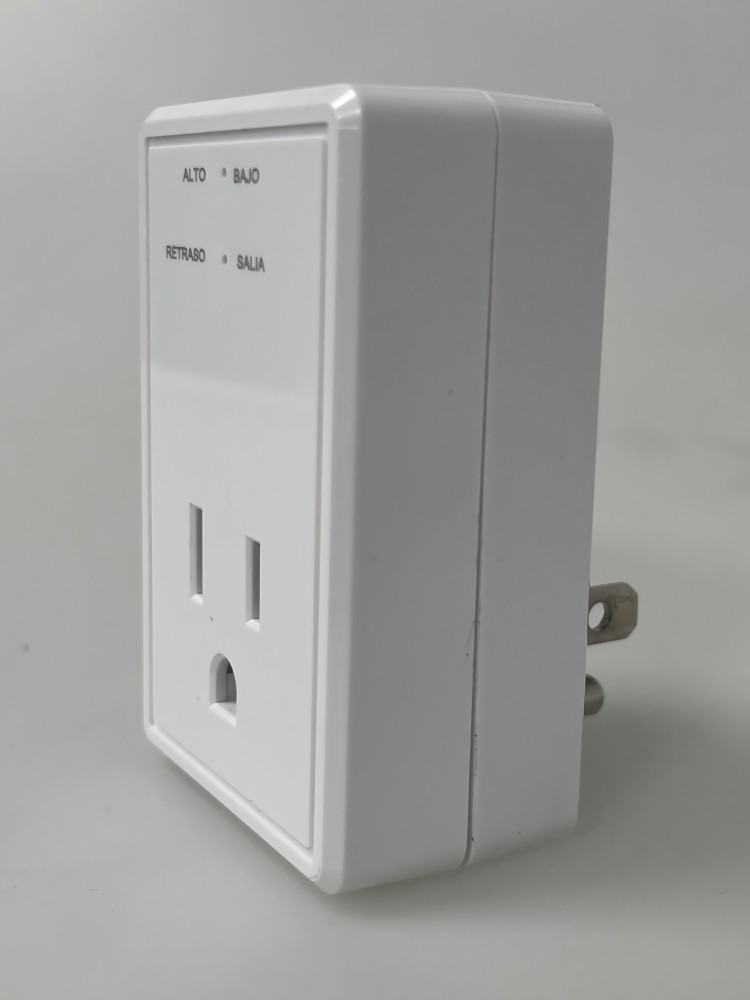
A reliable 110-volt surge protector will also include indicator lights that show whether the protection is still active. Over time and after absorbing multiple surges, MOVs can degrade and stop functioning while the device continues to pass power normally. That indicator light is your first alert that protection has been compromised and replacement is needed.
Modern televisions and computers contain sophisticated microprocessors, capacitors, and circuit boards that operate within very narrow voltage tolerances. Even a brief spike that lasts only milliseconds can cause permanent damage to a graphics card, motherboard, or display panel. This sensitivity makes using a quality 110-volt surge protector not optional but essential for anyone who wants to avoid costly repairs or replacements.
Smart TVs in particular are susceptible because they maintain constant network connections and may draw power in standby mode, exposing them to surges around the clock. Similarly, desktop computers with tower units and external monitors represent a significant investment that deserves dedicated protection from a properly rated 110-volt surge protector. The cost of a good surge protector is trivially small compared to replacing a high-end display or losing stored data on an unprotected hard drive.
The joule rating of a 110-volt surge protector tells you how much total energy it can absorb over its lifetime before its protective capacity is exhausted. For TVs and computers, you should look for a minimum joule rating of 1000 joules, and ideally 2000 joules or higher for comprehensive long-term protection. A higher joule rating means the device can withstand more frequent or more powerful surges without becoming ineffective.
It is important to note that joule ratings represent cumulative capacity, not per-event capacity. Each surge event consumes a portion of the total joule rating until protection is fully depleted. When shopping for a 110-volt surge protector for home entertainment systems or computer workstations in areas prone to frequent voltage fluctuations, investing in a higher joule rating provides a longer and more reliable service window.
Do not confuse joule rating with clamping voltage — both are important but measure different things. A surge protector with a high joule rating but poor clamping voltage may still allow damaging levels of voltage to reach your devices during a surge event.
Clamping voltage refers to the voltage level at which the 110-volt surge protector activates and begins diverting excess energy. Lower clamping voltages provide better protection because the device responds at a lower threshold, reducing the amount of excess voltage that passes through to your TV or computer. For a 110-volt system, a clamping voltage of 330 volts or less is considered good, while anything above 400 volts offers weaker protection.
Response time is equally critical. Even a few nanoseconds of delay during a surge can allow damaging current to reach your equipment. High-quality 110-volt surge protector units typically respond within one nanosecond, which is fast enough to protect against most types of electrical spikes. When comparing products, prioritize those that explicitly specify low clamping voltages and fast response times rather than relying solely on outlet count or physical size.
A 110-volt surge protector for a home entertainment setup typically needs to accommodate multiple devices simultaneously — a TV, a cable or satellite box, a game console, a soundbar, and possibly a streaming device. In a computer workstation, you may need outlets for a desktop tower, monitor, printer, router, and phone charger. Choosing a unit with adequate outlet spacing ensures that bulky adapters and power bricks do not block adjacent outlets.
Some 110-volt surge protector models include wide-spaced or rotating outlets specifically designed to accept large transformer plugs without wasting nearby outlets. This is a practical feature that significantly affects daily usability, especially in setups with several peripherals. Before purchasing, take inventory of every device you plan to connect and count how many outlets you actually need to avoid buying a unit that falls short.
Beyond basic surge protection, some advanced 110-volt surge protector models include automatic voltage regulation, also known as AVR. This feature actively stabilizes the incoming voltage before delivering it to connected devices, smoothing out not just spikes but also brownouts and sustained overvoltage conditions. For environments with consistently unstable grid power, AVR capability makes a substantial difference in protecting electronics over time.
Automatic reset and thermal protection features are also worth considering. A 110-volt surge protector with thermal protection will automatically shut off power if the device overheats, preventing fire hazards in demanding environments. The automatic reset feature restores power to connected devices once conditions return to normal, which is particularly useful for devices like routers and recording equipment that need to stay operational without manual intervention.
Look for models that also offer a master on/off switch with surge-protected output, allowing you to cut power to all connected devices simultaneously without unplugging them individually. This feature also eliminates standby power draw from multiple devices, contributing to modest energy savings over time.
When selecting a 110-volt surge protector for a television setup, consider the full ecosystem of devices in your entertainment center. Smart TVs, streaming sticks, soundbars, and gaming consoles all have different power requirements, and your surge protector needs to handle the combined current load safely. Check the maximum amperage rating of any 110-volt surge protector you consider and ensure it exceeds the total load of all connected devices.
For home theaters in areas with older or less stable electrical infrastructure, choosing a 110-volt surge protector that incorporates both surge protection and voltage regulation provides dual-layer defense. The surge protection component handles transient spikes while the voltage regulation component manages chronic low-voltage or high-voltage conditions that can also shorten the lifespan of display panels and audio equipment.
For a desktop computer workstation, the stakes around power quality are particularly high because data loss and hardware failure can be costly. A 110-volt surge protector with a high joule rating, fast response time, and a connected equipment warranty provides the most comprehensive coverage for a computer and its peripherals. Some surge protectors designed for computer use also include coaxial or ethernet port protection, which guards against surges entering through network or cable connections rather than just the power line.
Laptop users should not overlook surge protection either. Plugging a laptop adapter directly into an unprotected wall outlet exposes the battery and charging circuitry to the same voltage irregularities that threaten desktop equipment. Using a portable 110-volt surge protector travel unit is a smart habit for professionals who work from different locations and cannot always verify the quality of available power outlets.
For home offices that combine a computer workstation with networking equipment, printers, and monitors, a longer surge protector strip with both spaced outlets and cable management clips can dramatically reduce clutter while maintaining full protection for every connected device through a reliable 110-volt surge protector.
Proper placement and installation of a 110-volt surge protector is as important as the product specifications themselves. Connecting a surge protector to a grounded three-prong outlet is essential because the grounding connection provides the electrical path through which excess voltage is safely diverted. Plugging a surge protector into an ungrounded two-prong outlet significantly diminishes its protective effectiveness, even if the unit itself is otherwise high quality.
Avoid daisy-chaining surge protectors or plugging one into an extension cord. This practice not only creates a fire hazard but also interferes with the protective circuitry, potentially rendering the 110-volt surge protector ineffective. Each surge protector should connect directly to a wall outlet to ensure full protective performance under surge conditions.
A common mistake is assuming a 110-volt surge protector lasts indefinitely. As explained earlier, MOV components degrade over time as they absorb surges, and once the cumulative joule capacity is exhausted, the device no longer provides any protection. Monitoring the indicator light on your 110-volt surge protector and replacing units that show a fault light or have been in service through known surge events is essential maintenance.
As a general guideline, consider replacing your 110-volt surge protector every two to three years if you live in an area with frequent electrical storms or known grid instability. Even if the indicator light still shows green, the internal MOV capacity may be substantially depleted. Treating surge protectors as consumable protective devices rather than permanent fixtures ensures your TV and computer always have active, reliable protection.
For home electronics like a TV and computer, a minimum joule rating of 1000 joules is recommended, with 2000 joules or higher preferred for setups in areas prone to frequent surges. A higher joule rating extends the protective lifespan of the 110-volt surge protector and gives your devices more cumulative protection over time before the unit needs replacement.
Yes, you can use a single 110-volt surge protector with enough outlets to power both your TV and computer simultaneously, provided the unit is rated for the combined current load of all connected devices. Make sure the total amperage draw of your equipment does not exceed the surge protector's maximum rated amperage, and choose a model with appropriately spaced outlets to accommodate all power adapters.
Standard surge protectors are designed specifically to block high-voltage spikes, not to compensate for low-voltage conditions like brownouts. However, some advanced 110-volt surge protector models include automatic voltage regulation, which actively corrects both over-voltage and under-voltage conditions. If you experience frequent brownouts in addition to voltage spikes, choosing a unit with AVR capability provides more comprehensive protection for your electronics.
Most quality 110-volt surge protector units include a protection indicator light that signals whether the MOV components are still functional. If the indicator light shows a fault or turns off entirely, the surge protection has been exhausted even if the unit still passes power to connected devices. Regularly inspect this indicator light and replace the unit immediately if protection is shown as inactive to avoid leaving your TV and computer unprotected.

 EN
EN